All articles
·
10 min read
What is Bing's AI Performance Report? Tested and Explained
A hands-on test of what Bing's AI Performance report actually shows.

We have all gotten used to the Search Performance report in Google Search Console over the years. Bing Webmaster Tools just introduced something similar, but with a twist. The new AI Performance report does not show your visibility in classic search results. It shows how visible your brand is inside Copilot and Bing’s AI powered search experience.
The first question I asked myself when I saw this feature was simple. Can we actually run a meaningful analysis with this data, or is this just a fancy number with no real use?
So instead of just reading the documentation, I decided to test it myself. I pulled the data on one of the brands I work with, a global ecommerce brand selling at scale, and ran an actual side by side analysis between its Search Performance numbers and its AI Performance numbers. This article walks through exactly what I tried, what worked, what did not work, and what the real results looked like once I had both data sets in front of me.
At the end, I have also answered a few questions you might have if you want to run the same test on your own site.
What Exactly Does the AI Performance Report Show?
Bing Webmaster Tools already had a Search Performance report. Now there is a new tab next to it. This tab shows which queries your brand appears for inside Copilot and Bing AI experiences, how many times you were cited as a source, and how your visibility compares to competitors in the same answer.
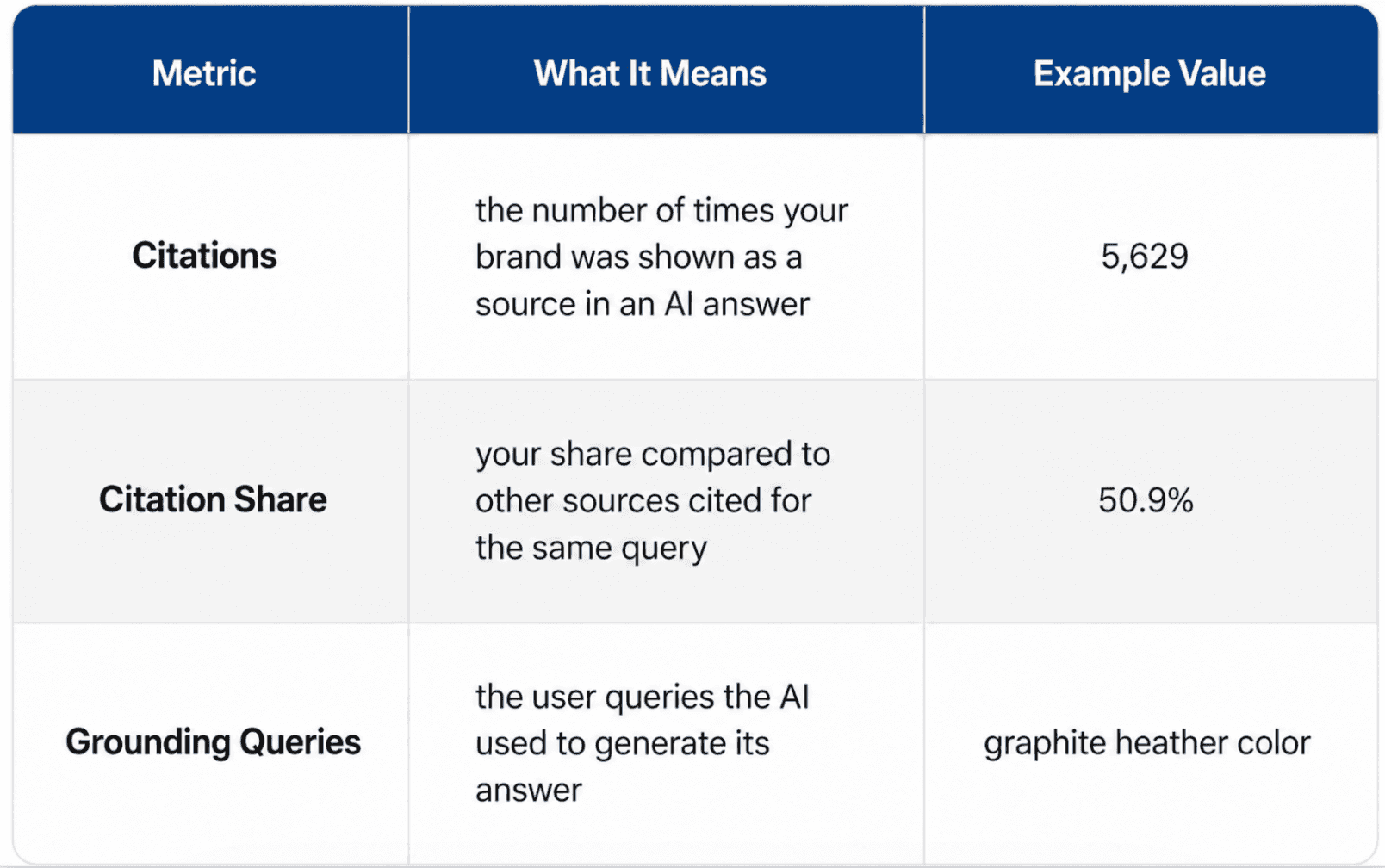
There are three core metrics. Citations, meaning how many times your brand was shown as a source inside an AI answer. Citation share, meaning what percentage of all sources shown for that query belonged to you versus competitors. Grounding queries, meaning the actual user queries the AI relied on when it decided to cite you.
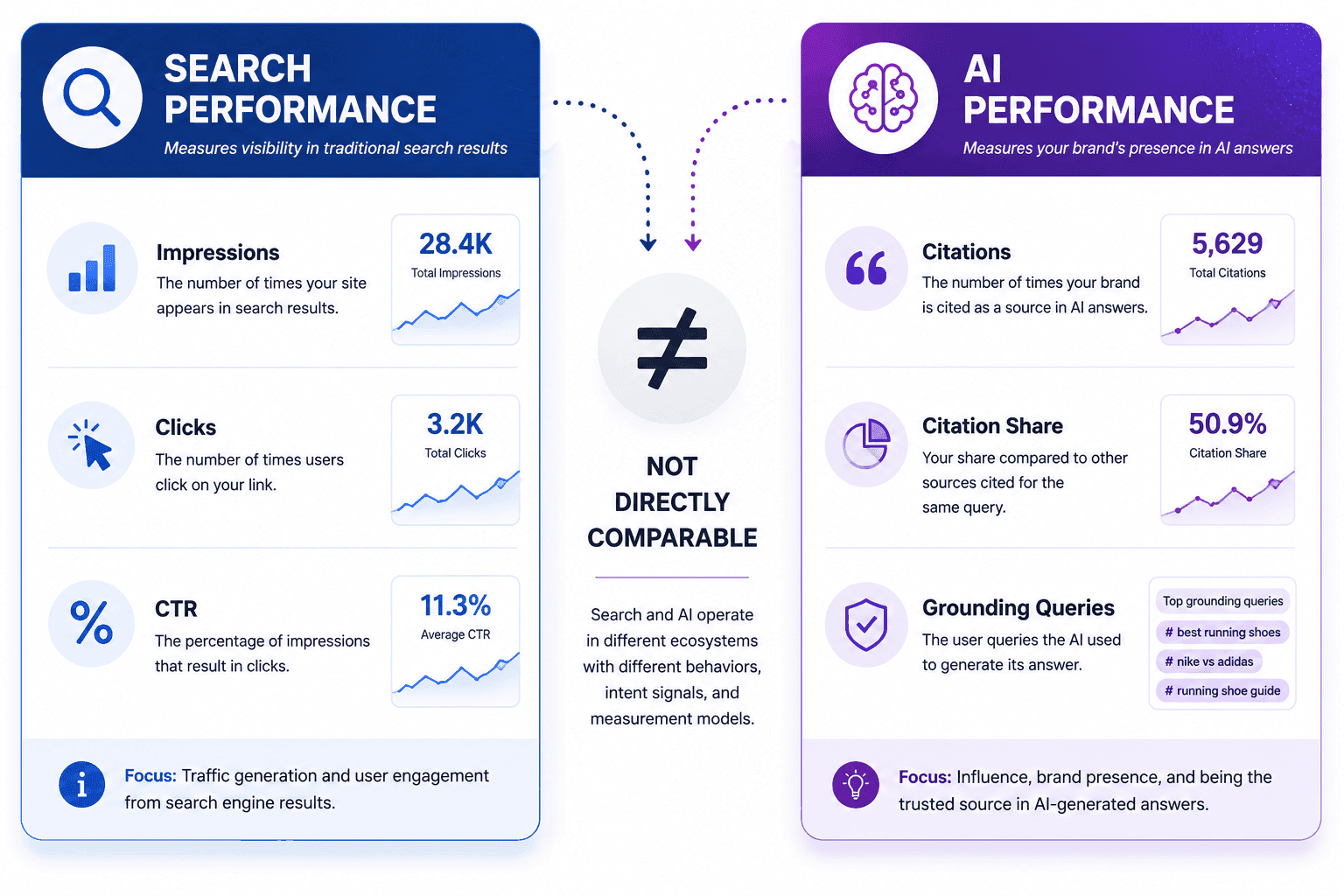
Together these three metrics work a bit like the AI side equivalent of impression and keyword reports in classic SEO. But it is not a direct equivalent, because what it measures is fundamentally different.
The practical side of the report works like this. Each row is a grounding query, next to it you see how many citations you got for that query and your citation share. Rows are sorted by citation count, so your highest cited queries appear at the top. This lets you quickly pull your top 100 queries, the same way you would pull a top keyword list from Search Performance.
Can We Compare This Data to Classic Search Data?
This is where things get tricky. The first thing I tried was a volume comparison. I wanted to see how much visibility came from AI Search versus how much came from classic Search. That turned out to be impossible.
The Search Performance report gives you impressions, clicks, and CTR. The AI Performance report gives you citations, citation share, and grounding queries. These two data sets cannot be converted into one another. On the AI side there is no number that tells you how many people actually saw your brand, only how many times you were cited as a source.
So you cannot make a statement like this. Search brought 10,000 impressions, AI brought 3,000 impressions. Doing a volume based comparison with this data is technically impossible right now.
Once I realized that, I decided to work with query behavior instead of volume. Both reports give you a list of the queries that drive your visibility. Comparing those lists is possible, even if comparing raw numbers is not.
One thing worth clarifying here. This limitation is not a gap in Bing’s reporting, it comes from the nature of AI search itself. Measuring how many people saw a single AI answer is far more complex than measuring how many people saw a search results page. The answer can be personalized, and the same question can produce different answers for different users. So the right mindset for this report is not impression based thinking, it is source attribution thinking.
What Did I Actually Test and How?
The analysis that is possible looks like this. You take the top visible queries from both channels and categorize what type of query each one is. That is what I did.
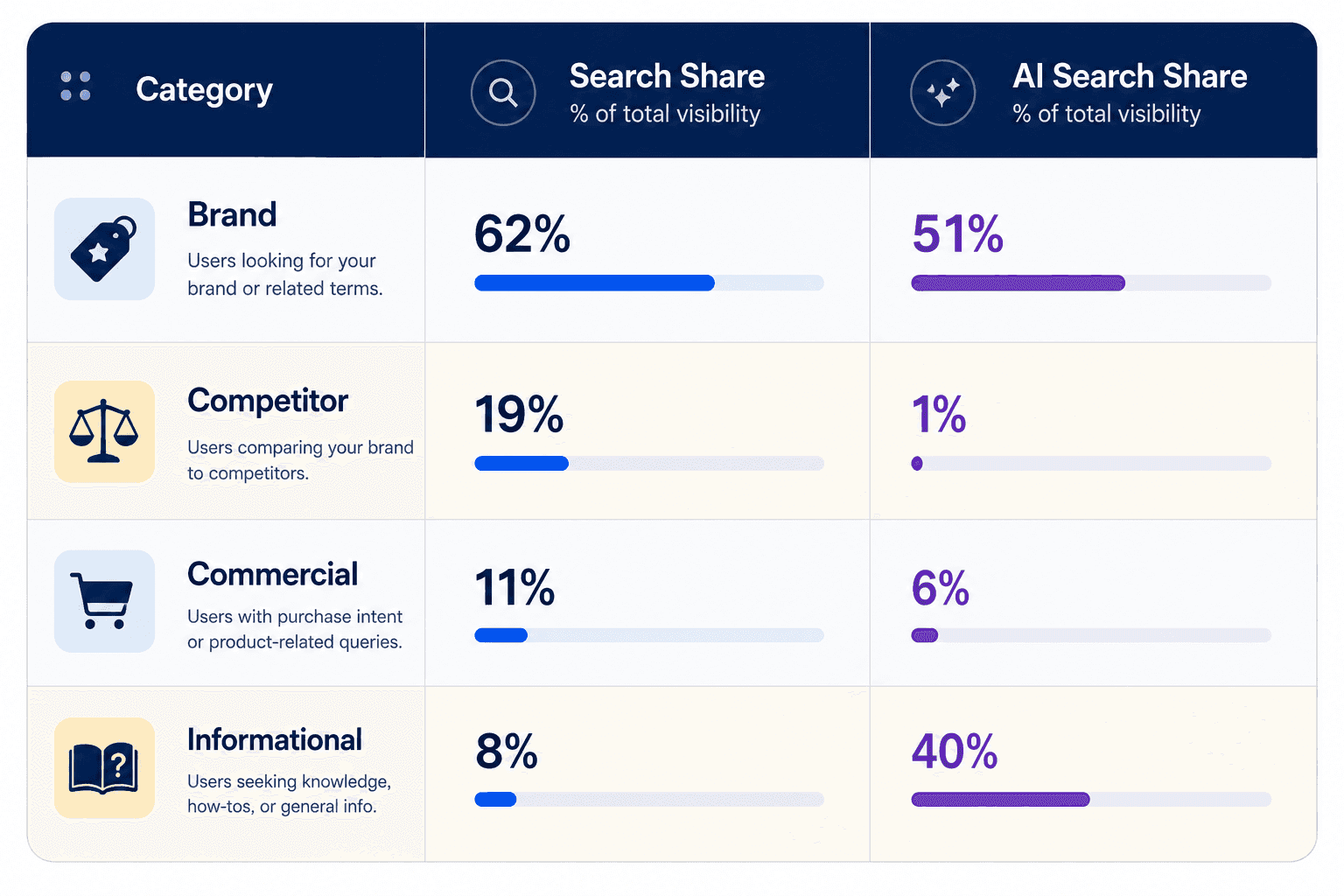
I pulled the top 100 highest volume queries from both Search and AI. Then I split these queries into four groups. Brand queries, competitor queries, commercial intent queries, and informational queries.
On the Search side, Bing does not provide an intent label, so I categorized each query manually based on the query text. On the AI Performance side, Bing already provides an intent label for each query, which makes that part of the work easier.
The goal was to answer one question. Do the query types that drive our visibility in Search match the query types that drive our visibility in AI?
You can repeat this categorization exercise on your own site. All you need is to export the query list from both reports and tag each query based on its text. For a 100 query list this takes about an afternoon, but the output becomes a reference you can use for months of content planning.

Is There a Difference Between Search and AI on Brand Queries?
The first result was this. Queries containing the brand name take the largest share in both Search and AI. In Search this share is 62 percent. In AI it is 51 percent.
This surprised me a little, because I expected AI to mostly serve users who do not yet know the brand, the discovery stage of the funnel. The data shows that assumption is incomplete. Users who already know the brand keep using AI experiences too.
This means the AI Performance report does not only show new user potential. It also reflects how existing brand demand carries over into AI.
There is a nuance worth noting here. A brand query means the user already knows you and is asking something related to your brand, things like brand name plus a product line, or brand name plus coupon code. Getting cited for these is relatively easy, since the AI already sees your brand page as the most relevant source. The real challenge is showing up for users who do not yet know your brand and are asking a more general question.

Which Query Type Performs Stronger in AI Search?
This is the third and arguably most actionable finding. Informational queries, meaning searches done to learn product features or check usage instructions, make up only 8 percent of total visibility in Search. In AI, that share jumps to 40 percent.
That is nearly a five fold difference, and it is not random. The grounding query data in the AI Performance report shows this clearly. When users ask AI things like what does this color look like or how do you apply this material, our brand gets cited as a source in those answers.
On the Search side, these same queries do not even make it into the top 100. The AI Performance report exposes a layer of visibility that the Search Performance report simply cannot see.
The practical takeaway is this. When using this report, check whether your usage guides and technical explainer content are getting cited, not just your product pages. Most brands underinvest in this content type, which leaves an open gap on the AI side.
There is likely a technical reason behind this pattern too. AI models tend to favor citing content that is clear, structured, and directly answers a question. A product page is usually written to sell, not to directly answer a specific question. A usage guide or an FAQ section is much closer to the answer format AI models are looking for. This could explain why informational content earns more citations than commercial content.

Does AI Visibility Actually Translate Into Sales?
The fourth category was commercial intent queries. These are searches made with purchase intent but without mentioning a brand name. In Search these queries take 11 percent of visibility. In AI that drops to 6 percent.
My expectation was that AI would score higher here, since AI assistants are often described as being closer to the purchase decision. The data did not support that.
This also reveals a real limit of the AI Performance report. The report tells you how often you were cited, but it does not tell you whether that citation led to a sale. Saying our AI visibility is high so sales will follow is not something this data currently supports. The report measures visibility, not conversion.
It is worth not overreading this either. This result does not mean AI search has no effect on sales at all. It only shows that, for this particular brand, users are not yet using AI primarily to make a purchase decision, they are using it mostly to understand the product. This behavior could shift over time, especially as AI assistants gain more shopping focused features. For now, it is more realistic to keep expectations modest when reading this part of the report.
What Does the Report Reveal When You Hold the Brand Constant?
To bring all the findings together, I held the brand constant and laid out four questions that the AI Performance report effectively answers.
Is the user searching for the brand? Yes in both channels, slightly stronger in Search.
Is the user researching competitors? A strong yes in Search, almost no in AI.
Is the user trying to learn about the product? Weak in Search, very strong in AI.
Is the user trying to make a purchase? Moderate in both channels, slightly weaker in AI.
These four questions show what the AI Performance report is really good for. It does not tell you how visible you are in AI. It tells you what the AI user actually wants from you. That should be the main way to use it.
When you apply this same framework to your own brand, you will likely see a different table. If your product category is not complex, the informational share might be lower. If your market is highly competitive, the competitor share might be high in both channels. What matters is not the exact numbers, it is seeing where you are strong and where you are weak.
What Should You Watch Out for When Using This Report?
After testing this feature, here are the practical notes I would pass on.
Do not run a volume comparison, the report was not built for that. Placing citation counts next to Search impressions and drawing conclusions from that is misleading.
Look at query composition. Seeing which query types earn citations and which ones do not is where the real value of this report lives.
Identify content gaps. If you are not getting cited for competitor queries or informational queries, that usually points to a missing content type.
Do not confuse this with conversion. Getting cited means the AI is showing you as a source, it does not mean a guaranteed sale.
Track it periodically. Since this report is still very new, the underlying data volume is likely to shift. Checking it once a month to build a trend is a better approach than a one time look.
This feature inside Bing Webmaster Tools is still very new and clearly evolving. But even at this early stage, asking the right questions of it gives you a usable read on where your brand stands inside AI search.

Frequently Asked Questions About Bing Webmaster Tools AI Search
Where can I find the AI Performance report inside Bing Webmaster Tools?
It sits next to the Search Performance report in the left side menu, as a separate tab. If you already have a Bing Webmaster Tools account with a verified site, you can access this tab without any extra setup.
Which AI experiences does this report actually cover?
The report shows citation data from Bing’s AI powered answers integrated into search results, along with Copilot. It does not cover AI tools built by other companies outside of Bing’s own ecosystem.
What can I do to earn more citations?
There is no exact formula, but the pattern in this analysis gives a strong hint. Content that is clear, well structured, and directly answers a specific question seems more likely to get cited. Adding usage guides, FAQ sections, and technical explainer pages alongside your product pages can improve your odds.
Why am I strong in Search for a query but get no citations for it in AI?
A few reasons are possible. The query might be strong in Search but is simply not asked as often inside AI experiences. Or it is asked just as often, but your content is not in the answer format AI tends to cite. The fastest way to tell which one it is is to ask the question yourself inside Copilot and see which sources come up.
How many queries do I need to analyze for this to be meaningful?
In this analysis I worked with the top 100 highest volume queries and that sample size produced a clear pattern. Smaller sites might get a meaningful read with 50 queries, what matters more is having enough examples spread across each category. If a category only has two or three queries, treat any conclusion from that category with caution.

