Back

Back

How to Read Search Intent with Google Trends: 2026 Guide

Learn when to create landing pages vs blogs using Gemini-powered intent analysis.

Jan 23, 2026

Universal Commerce Protocol (UCP)

Google Trends isn't a volume tool, and it never was. If you're looking at it expecting exact search numbers, you're using the wrong platform. What it does offer is something far more valuable: direction. And with the recent integration of Gemini AI into Google Trends Explore, that directional power has become exponentially stronger.

By the end of this post, you'll know exactly when to create a new landing page versus when to publish a blog post. You'll understand how to read search intent through trend data, and how to use Gemini's suggestions to uncover content opportunities before your competitors even know they exist.

Google Trends Explore with AI (Gemini): What It Does for SEO?

Google Trends has always been useful for spotting patterns. You enter a keyword, see if it's rising or falling, maybe compare a few terms, and call it a day. That's the classic workflow, and it still works.

But Gemini changes the game entirely.

Instead of manually testing query after query to find related search behavior, Gemini analyzes the data and surfaces AI-powered suggestions automatically. It doesn't find keywords for you. That's not its job. What it does is show you which sub-topics and intent variations you should be looking at.
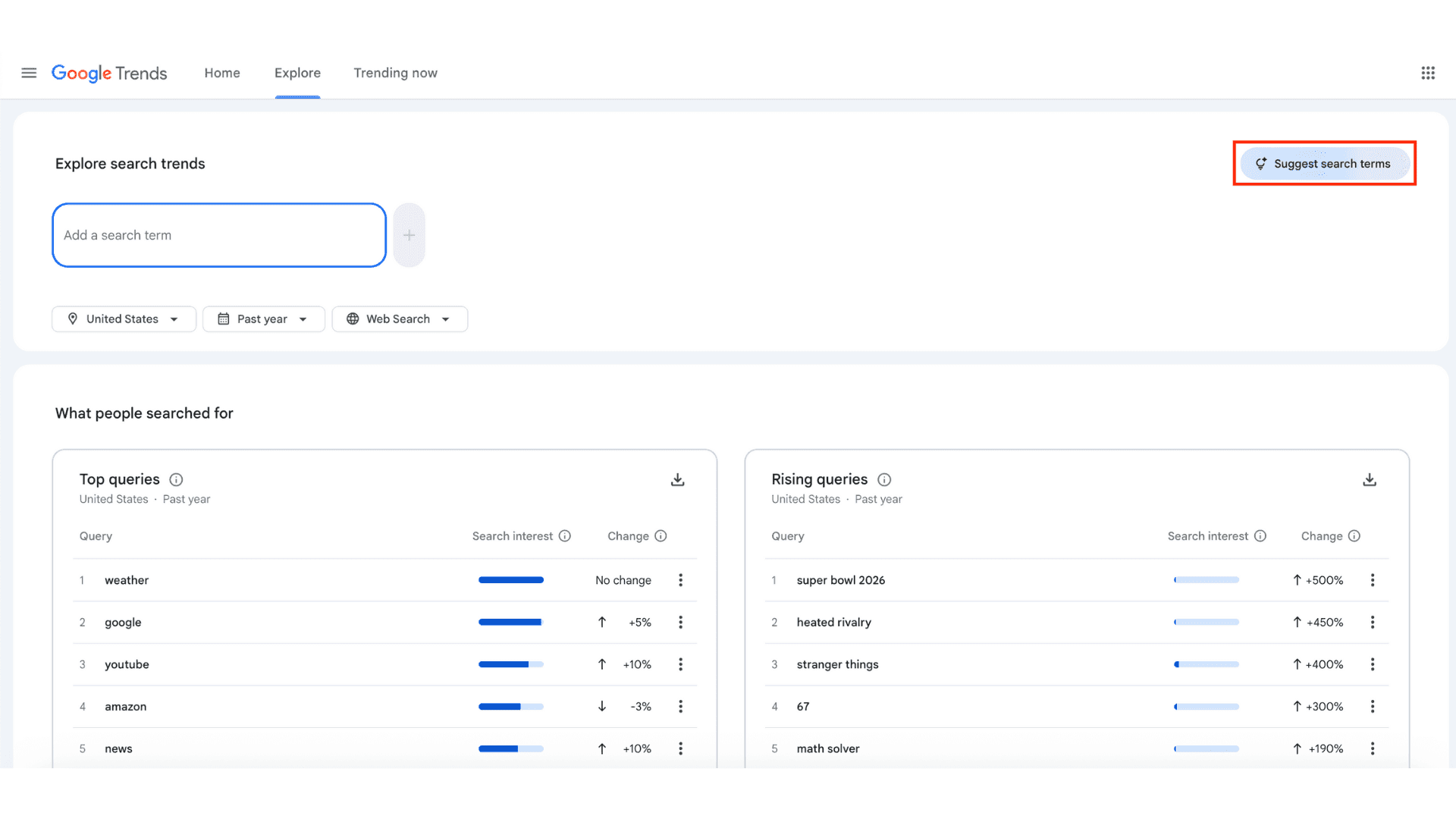
Let me be clear about positioning here: Gemini is not a keyword research tool. It won't give you search volumes or competition scores. What it will do is tell you where to dig deeper.

Take "seo audit" as an example. If you search that term in Google Trends and activate Gemini, you'll see it breaking down the topic into different user intents: people looking for checklists, people searching for tools, people wanting to hire a service. These are not synonyms. They're entirely different content opportunities.
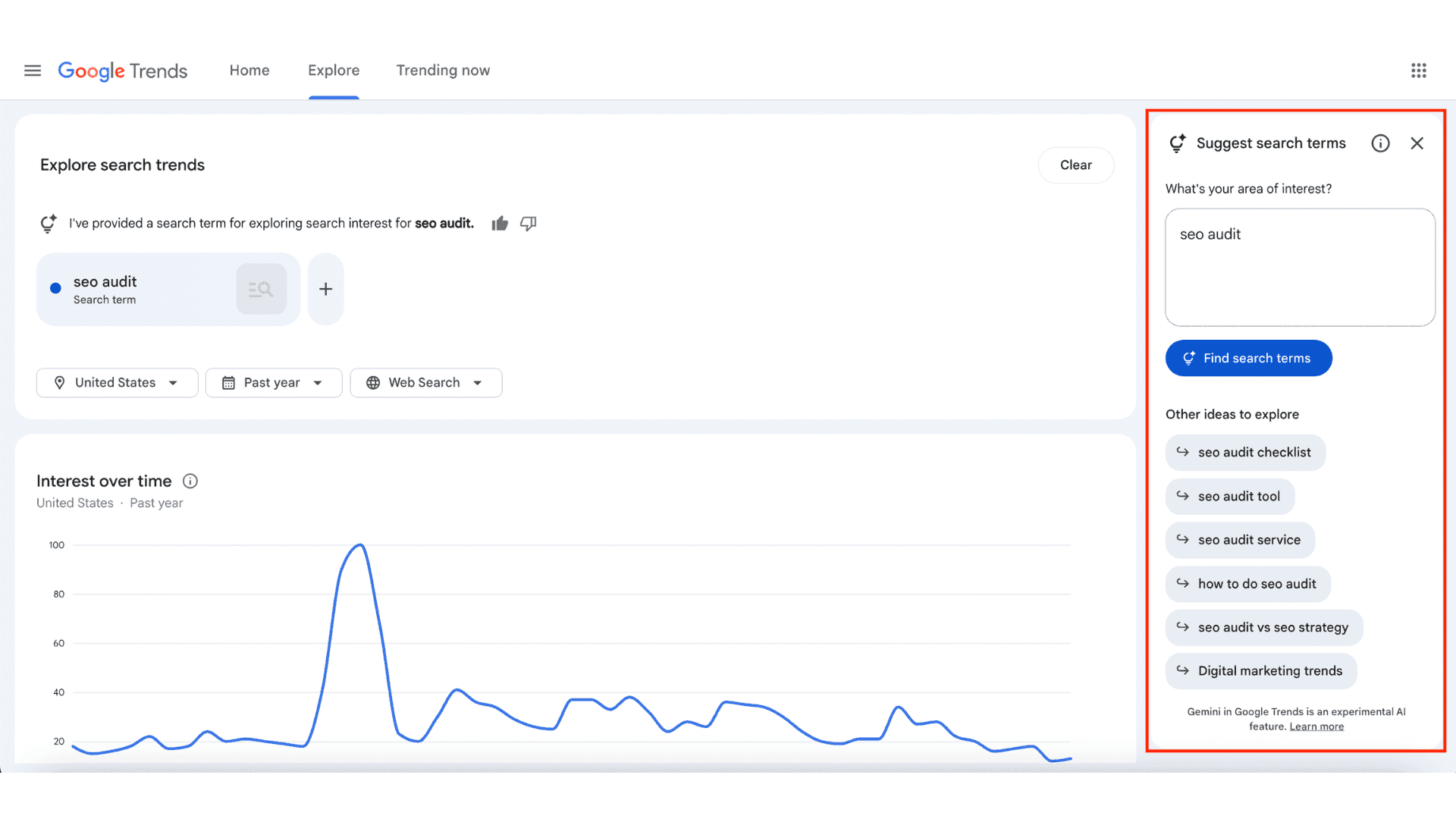
How to Read Gemini's Suggested Queries?

Here's where most people get it wrong: they treat Gemini's suggestions like a list of interchangeable keywords. They're not.

Even if two queries have similar search volume, they can represent completely different user intents. And if you try to target multiple intents on a single page, you'll dilute your relevance and confuse both users and search engines.

Let me show you what I mean with "seo audit" as the main theme:

  • seo audit checklist → informational (user wants a step-by-step guide)

  • seo audit tool → commercial (user is comparing software options)

  • seo audit service → transactional (user is ready to hire someone)

  • how to do seo audit → informational (user wants to learn the process)

Same topic. Four completely different intents.

The core lesson here is simple: search intent comes before search volume. A high-volume keyword with the wrong intent for your page type will never convert. A lower-volume keyword with perfect intent alignment will outperform it every time.

How to Validate Gemini Suggestions with Keyword Planner and Third-Party Tools?

Gemini's role is idea generation. It shows you where the intent splits are happening. But it doesn't tell you which of those splits are worth pursuing from a traffic or business perspective. That's where keyword tools come in.

Here's the validation workflow:

  1. Export 8 to 15 query suggestions from Gemini

  2. Input those exact queries into Keyword Planner, Ahrefs, or Semrush

  3. Check three things: search volume, competition level, and commercial signals

But here's the part people miss: don't eliminate a query just because it has low or zero volume. If Trends shows it's rising and Gemini flagged it as a growing intent, that's an early-mover opportunity.

Let's say Gemini surfaces "llm seo" as a related query. You check Keyword Planner and see almost no volume. Most people would skip it. But if you look at Google Trends and see a sharp upward trajectory over the past six months, that's a signal to create content now, before the competition catches on.

In this case, the right move is a thought leadership blog post, not a landing page. You're positioning early, building authority in an emerging topic, and preparing to own that space when volume does materialize.

You can structure your validation in a simple table format:

Query

Volume

Trend Direction

Intent Type

Content Decision

llm seo

Low

Rising

Informational

Blog post

seo audit tool

Medium

Stable

Commercial

Landing page

This keeps your decision-making process transparent and repeatable.

Case Study: Finding a New Landing Page Opportunity from Gemini Queries

This is the most critical section of the entire post, so I'm going to walk through a real example step by step.

Let's start with why "seo audit" was chosen as the main theme. It's broad enough to have multiple intent angles, but specific enough to drive actual business outcomes. It sits at the intersection of informational and commercial intent, which makes it perfect for testing Gemini's segmentation capabilities.

Here's how the process unfolded:

Step 1: Gemini surfaces related queries

After entering "seo audit" into Google Trends and activating Gemini, the tool suggested around 12 variations, including "seo audit checklist," "technical seo audit," "free seo audit tool," and "seo audit service pricing."

Step 2: Filter by intent type

I grouped these into three buckets:

  • Informational (how-to, checklist, guide)

  • Commercial (tool, software, comparison)

  • Transactional (service, pricing, hire)

Step 3: Validate with keyword data

I ran each query through Keyword Planner and cross-checked with Ahrefs. Some had decent volume but declining trends. Others had low volume but sharp upward movement. A few had both volume and stability, which flagged them as prime landing page candidates.

Step 4: Make the decision

The final decision matrix looked like this:

Query

Trend Direction

Volume

Intent

Output

seo audit checklist

Stable

Medium

Informational

Blog

seo audit tool

Stable

High

Commercial

Landing page

technical seo audit

Rising

Low

Informational

Blog

seo audit service

Stable

Medium

Transactional

Landing page

The decision logic is straightforward:

  • Commercial intent + stable trend = landing page

  • Informational intent + rising trend = blog post

  • Mixed intent = pillar page + supporting content cluster

In this case, "seo audit tool" became a landing page targeting users ready to compare and choose software. "seo audit checklist" became a blog post designed to capture informational traffic and nurture users toward the tool comparison page.

When to Create a New Landing Page vs. Blog Content?

The difference between a landing page and a blog post isn't about length or format. It's about SERP intent.

If you search a keyword and the results are dominated by product pages, comparison charts, and CTAs, that's a landing page keyword. If the results are guides, tutorials, and listicles, that's a blog keyword.

Look for these signals:

Landing page indicators:

  • "best," "top," "tool," "software," "vs," "comparison"

  • SERP shows product pages, software directories, or paid ads

  • User is comparing options or ready to take action

Blog post indicators:

  • "how to," "what is," "checklist," "guide," "tips"

  • SERP shows editorial content, step-by-step tutorials

  • User is learning or exploring the topic

Here's the rule: never try to target two different intents on one page. If you mix informational and commercial content on a single landing page, you'll confuse both the algorithm and the user. Split them into separate assets and link them strategically.

A wrong content type will waste even a perfect keyword. If you build a blog post for a commercial query, you won't rank. If you build a landing page for an informational query, you won't convert.

Catching Early Trends with Gemini: Creating Content Before Volume Emerges

Keyword tools look backward. They tell you what people searched for last month, last quarter, last year. Google Trends and Gemini look forward. They show you where search behavior is heading.

This is where early positioning becomes a massive advantage.

When you create content around a rising trend before it has significant volume, you're building authority in a space with minimal competition. By the time that topic hits mainstream search volume, you're already the established source. Google sees you as the original voice, not a latecomer.

Look at these example queries that Gemini has been surfacing recently:

  • "generative engine optimization"

  • "ai visibility"

  • "answer engine optimization"

None of these have high search volume yet. But all of them are rising sharply in Google Trends. If you wait until they show up in Keyword Planner with decent volume, you've already lost the early-mover advantage.

The brands that will dominate these topics in 2027 are the ones creating content about them right now, in early 2026.

If you have access to the "Related Queries" section in Google Trends and filter by "Rising," you'll see exactly which terms are accelerating fastest. Those are your early content opportunities.

Turning Google Trends and Gemini Data into a Content Roadmap

One piece of content isn't a strategy. A topic cluster is.

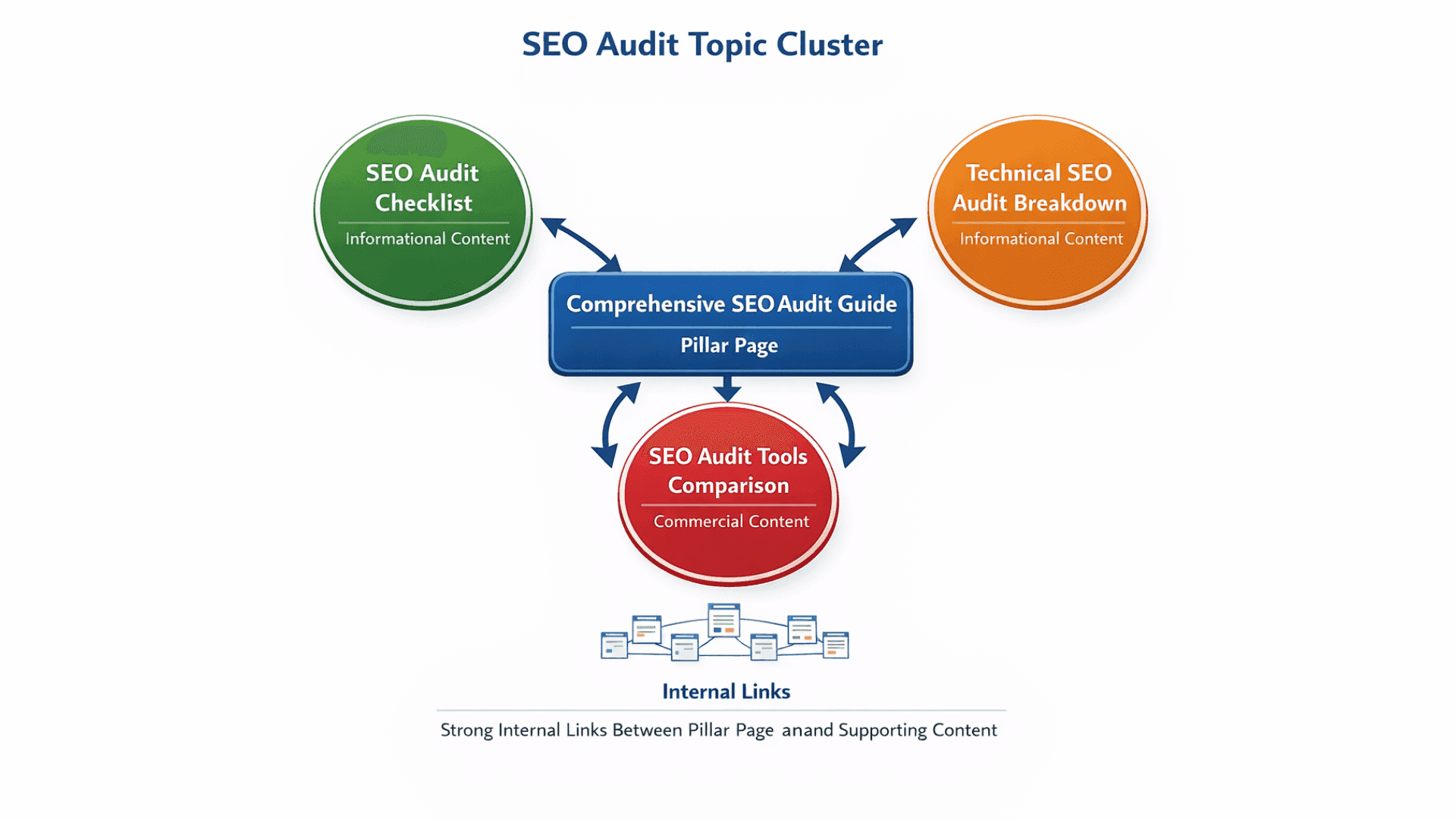
Gemini's suggestions shouldn't result in a single blog post or landing page. They should map out an entire content ecosystem, with a pillar page at the center and supporting content branching out to cover intent variations.

Here's how that works in practice:

Main topic: SEO Audit

  • Pillar page: Complete SEO Audit Guide (comprehensive, targets the main keyword)

  • Supporting content:

    • SEO Audit Checklist (informational)

    • Technical SEO Audit Breakdown (informational)

    • SEO Audit Tools Comparison (commercial)

Each supporting piece links back to the pillar, and the pillar links out to each support article. This creates a strong internal linking structure, establishes topical authority, and ensures you're capturing traffic across the full intent spectrum.
Keyword tools help you prioritize which support pieces to create first based on volume and competition. Gemini helps you identify which pieces need to exist at all.

What to Watch Out for When Using Google Trends Explore with AI?

Google Trends data is relative, not absolute. A score of 100 doesn't mean 100 searches. It means peak interest within the selected time frame. A score of 50 means half the peak interest. This is why you can't rely on Trends alone for volume estimation.

Gemini's suggestions are powerful, but they're not validated. You still need to cross-check them with keyword tools, SERP analysis, and your own strategic judgment. Don't assume that every Gemini suggestion is worth pursuing just because the AI flagged it.

Also, don't make decisions based on a single data point. One graph showing a spike doesn't confirm a trend. Look at patterns over time, compare multiple queries, and validate intent with real search results.

How to Position Google Trends and Gemini in Your SEO Workflow?

Google Trends shows you direction. Gemini accelerates your understanding of that direction. Keyword tools help you make the final call on what to create and when.

This isn't about replacing your existing workflow. It's about adding a layer that helps you see around corners, catch trends early, and align content with actual user intent instead of guessing based on keyword strings.

Google Trends and Gemini don't answer "what should I write?" They answer "where should I be looking?" And that's a far more valuable question.

Google Trends isn't a volume tool, and it never was. If you're looking at it expecting exact search numbers, you're using the wrong platform. What it does offer is something far more valuable: direction. And with the recent integration of Gemini AI into Google Trends Explore, that directional power has become exponentially stronger.

By the end of this post, you'll know exactly when to create a new landing page versus when to publish a blog post. You'll understand how to read search intent through trend data, and how to use Gemini's suggestions to uncover content opportunities before your competitors even know they exist.

Google Trends Explore with AI (Gemini): What It Does for SEO?

Google Trends has always been useful for spotting patterns. You enter a keyword, see if it's rising or falling, maybe compare a few terms, and call it a day. That's the classic workflow, and it still works.

But Gemini changes the game entirely.

Instead of manually testing query after query to find related search behavior, Gemini analyzes the data and surfaces AI-powered suggestions automatically. It doesn't find keywords for you. That's not its job. What it does is show you which sub-topics and intent variations you should be looking at.

Let me be clear about positioning here: Gemini is not a keyword research tool. It won't give you search volumes or competition scores. What it will do is tell you where to dig deeper.

Take "seo audit" as an example. If you search that term in Google Trends and activate Gemini, you'll see it breaking down the topic into different user intents: people looking for checklists, people searching for tools, people wanting to hire a service. These are not synonyms. They're entirely different content opportunities.

How to Read Gemini's Suggested Queries?

Here's where most people get it wrong: they treat Gemini's suggestions like a list of interchangeable keywords. They're not.

Even if two queries have similar search volume, they can represent completely different user intents. And if you try to target multiple intents on a single page, you'll dilute your relevance and confuse both users and search engines.

Let me show you what I mean with "seo audit" as the main theme:

  • seo audit checklist → informational (user wants a step-by-step guide)

  • seo audit tool → commercial (user is comparing software options)

  • seo audit service → transactional (user is ready to hire someone)

  • how to do seo audit → informational (user wants to learn the process)

Same topic. Four completely different intents.

The core lesson here is simple: search intent comes before search volume. A high-volume keyword with the wrong intent for your page type will never convert. A lower-volume keyword with perfect intent alignment will outperform it every time.

How to Validate Gemini Suggestions with Keyword Planner and Third-Party Tools?

Gemini's role is idea generation. It shows you where the intent splits are happening. But it doesn't tell you which of those splits are worth pursuing from a traffic or business perspective. That's where keyword tools come in.

Here's the validation workflow:

  1. Export 8 to 15 query suggestions from Gemini

  2. Input those exact queries into Keyword Planner, Ahrefs, or Semrush

  3. Check three things: search volume, competition level, and commercial signals

But here's the part people miss: don't eliminate a query just because it has low or zero volume. If Trends shows it's rising and Gemini flagged it as a growing intent, that's an early-mover opportunity.

Let's say Gemini surfaces "llm seo" as a related query. You check Keyword Planner and see almost no volume. Most people would skip it. But if you look at Google Trends and see a sharp upward trajectory over the past six months, that's a signal to create content now, before the competition catches on.

In this case, the right move is a thought leadership blog post, not a landing page. You're positioning early, building authority in an emerging topic, and preparing to own that space when volume does materialize.

You can structure your validation in a simple table format:

Query

Volume

Trend Direction

Intent Type

Content Decision

llm seo

Low

Rising

Informational

Blog post

seo audit tool

Medium

Stable

Commercial

Landing page

This keeps your decision-making process transparent and repeatable.

Case Study: Finding a New Landing Page Opportunity from Gemini Queries

This is the most critical section of the entire post, so I'm going to walk through a real example step by step.

Let's start with why "seo audit" was chosen as the main theme. It's broad enough to have multiple intent angles, but specific enough to drive actual business outcomes. It sits at the intersection of informational and commercial intent, which makes it perfect for testing Gemini's segmentation capabilities.

Here's how the process unfolded:

Step 1: Gemini surfaces related queries

After entering "seo audit" into Google Trends and activating Gemini, the tool suggested around 12 variations, including "seo audit checklist," "technical seo audit," "free seo audit tool," and "seo audit service pricing."

Step 2: Filter by intent type

I grouped these into three buckets:

  • Informational (how-to, checklist, guide)

  • Commercial (tool, software, comparison)

  • Transactional (service, pricing, hire)

Step 3: Validate with keyword data

I ran each query through Keyword Planner and cross-checked with Ahrefs. Some had decent volume but declining trends. Others had low volume but sharp upward movement. A few had both volume and stability, which flagged them as prime landing page candidates.

Step 4: Make the decision

The final decision matrix looked like this:

Query

Trend Direction

Volume

Intent

Output

seo audit checklist

Stable

Medium

Informational

Blog

seo audit tool

Stable

High

Commercial

Landing page

technical seo audit

Rising

Low

Informational

Blog

seo audit service

Stable

Medium

Transactional

Landing page

The decision logic is straightforward:

  • Commercial intent + stable trend = landing page

  • Informational intent + rising trend = blog post

  • Mixed intent = pillar page + supporting content cluster

In this case, "seo audit tool" became a landing page targeting users ready to compare and choose software. "seo audit checklist" became a blog post designed to capture informational traffic and nurture users toward the tool comparison page.

When to Create a New Landing Page vs. Blog Content?

The difference between a landing page and a blog post isn't about length or format. It's about SERP intent.

If you search a keyword and the results are dominated by product pages, comparison charts, and CTAs, that's a landing page keyword. If the results are guides, tutorials, and listicles, that's a blog keyword.

Look for these signals:

Landing page indicators:

  • "best," "top," "tool," "software," "vs," "comparison"

  • SERP shows product pages, software directories, or paid ads

  • User is comparing options or ready to take action

Blog post indicators:

  • "how to," "what is," "checklist," "guide," "tips"

  • SERP shows editorial content, step-by-step tutorials

  • User is learning or exploring the topic

Here's the rule: never try to target two different intents on one page. If you mix informational and commercial content on a single landing page, you'll confuse both the algorithm and the user. Split them into separate assets and link them strategically.

A wrong content type will waste even a perfect keyword. If you build a blog post for a commercial query, you won't rank. If you build a landing page for an informational query, you won't convert.

Catching Early Trends with Gemini: Creating Content Before Volume Emerges

Keyword tools look backward. They tell you what people searched for last month, last quarter, last year. Google Trends and Gemini look forward. They show you where search behavior is heading.

This is where early positioning becomes a massive advantage.

When you create content around a rising trend before it has significant volume, you're building authority in a space with minimal competition. By the time that topic hits mainstream search volume, you're already the established source. Google sees you as the original voice, not a latecomer.

Look at these example queries that Gemini has been surfacing recently:

  • "generative engine optimization"

  • "ai visibility"

  • "answer engine optimization"

None of these have high search volume yet. But all of them are rising sharply in Google Trends. If you wait until they show up in Keyword Planner with decent volume, you've already lost the early-mover advantage.

The brands that will dominate these topics in 2027 are the ones creating content about them right now, in early 2026.

If you have access to the "Related Queries" section in Google Trends and filter by "Rising," you'll see exactly which terms are accelerating fastest. Those are your early content opportunities.

Turning Google Trends and Gemini Data into a Content Roadmap

One piece of content isn't a strategy. A topic cluster is.

Gemini's suggestions shouldn't result in a single blog post or landing page. They should map out an entire content ecosystem, with a pillar page at the center and supporting content branching out to cover intent variations.

Here's how that works in practice:

Main topic: SEO Audit

  • Pillar page: Complete SEO Audit Guide (comprehensive, targets the main keyword)

  • Supporting content:

    • SEO Audit Checklist (informational)

    • Technical SEO Audit Breakdown (informational)

    • SEO Audit Tools Comparison (commercial)

Each supporting piece links back to the pillar, and the pillar links out to each support article. This creates a strong internal linking structure, establishes topical authority, and ensures you're capturing traffic across the full intent spectrum.

Keyword tools help you prioritize which support pieces to create first based on volume and competition. Gemini helps you identify which pieces need to exist at all.

What to Watch Out for When Using Google Trends Explore with AI?

Google Trends data is relative, not absolute. A score of 100 doesn't mean 100 searches. It means peak interest within the selected time frame. A score of 50 means half the peak interest. This is why you can't rely on Trends alone for volume estimation.

Gemini's suggestions are powerful, but they're not validated. You still need to cross-check them with keyword tools, SERP analysis, and your own strategic judgment. Don't assume that every Gemini suggestion is worth pursuing just because the AI flagged it.

Also, don't make decisions based on a single data point. One graph showing a spike doesn't confirm a trend. Look at patterns over time, compare multiple queries, and validate intent with real search results.

How to Position Google Trends and Gemini in Your SEO Workflow?

Google Trends shows you direction. Gemini accelerates your understanding of that direction. Keyword tools help you make the final call on what to create and when.

This isn't about replacing your existing workflow. It's about adding a layer that helps you see around corners, catch trends early, and align content with actual user intent instead of guessing based on keyword strings.

Google Trends and Gemini don't answer "what should I write?" They answer "where should I be looking?" And that's a far more valuable question.

Google Trends isn't a volume tool, and it never was. If you're looking at it expecting exact search numbers, you're using the wrong platform. What it does offer is something far more valuable: direction. And with the recent integration of Gemini AI into Google Trends Explore, that directional power has become exponentially stronger.

By the end of this post, you'll know exactly when to create a new landing page versus when to publish a blog post. You'll understand how to read search intent through trend data, and how to use Gemini's suggestions to uncover content opportunities before your competitors even know they exist.

Google Trends Explore with AI (Gemini): What It Does for SEO?

Google Trends has always been useful for spotting patterns. You enter a keyword, see if it's rising or falling, maybe compare a few terms, and call it a day. That's the classic workflow, and it still works.

But Gemini changes the game entirely.

Instead of manually testing query after query to find related search behavior, Gemini analyzes the data and surfaces AI-powered suggestions automatically. It doesn't find keywords for you. That's not its job. What it does is show you which sub-topics and intent variations you should be looking at.

Let me be clear about positioning here: Gemini is not a keyword research tool. It won't give you search volumes or competition scores. What it will do is tell you where to dig deeper.

Take "seo audit" as an example. If you search that term in Google Trends and activate Gemini, you'll see it breaking down the topic into different user intents: people looking for checklists, people searching for tools, people wanting to hire a service. These are not synonyms. They're entirely different content opportunities.

How to Read Gemini's Suggested Queries?

Here's where most people get it wrong: they treat Gemini's suggestions like a list of interchangeable keywords. They're not.

Even if two queries have similar search volume, they can represent completely different user intents. And if you try to target multiple intents on a single page, you'll dilute your relevance and confuse both users and search engines.

Let me show you what I mean with "seo audit" as the main theme:

  • seo audit checklist → informational (user wants a step-by-step guide)

  • seo audit tool → commercial (user is comparing software options)

  • seo audit service → transactional (user is ready to hire someone)

  • how to do seo audit → informational (user wants to learn the process)

Same topic. Four completely different intents.

The core lesson here is simple: search intent comes before search volume. A high-volume keyword with the wrong intent for your page type will never convert. A lower-volume keyword with perfect intent alignment will outperform it every time.

How to Validate Gemini Suggestions with Keyword Planner and Third-Party Tools?

Gemini's role is idea generation. It shows you where the intent splits are happening. But it doesn't tell you which of those splits are worth pursuing from a traffic or business perspective. That's where keyword tools come in.

Here's the validation workflow:

  1. Export 8 to 15 query suggestions from Gemini

  2. Input those exact queries into Keyword Planner, Ahrefs, or Semrush

  3. Check three things: search volume, competition level, and commercial signals

But here's the part people miss: don't eliminate a query just because it has low or zero volume. If Trends shows it's rising and Gemini flagged it as a growing intent, that's an early-mover opportunity.

Let's say Gemini surfaces "llm seo" as a related query. You check Keyword Planner and see almost no volume. Most people would skip it. But if you look at Google Trends and see a sharp upward trajectory over the past six months, that's a signal to create content now, before the competition catches on.

In this case, the right move is a thought leadership blog post, not a landing page. You're positioning early, building authority in an emerging topic, and preparing to own that space when volume does materialize.

You can structure your validation in a simple table format:

Query

Volume

Trend Direction

Intent Type

Content Decision

llm seo

Low

Rising

Informational

Blog post

seo audit tool

Medium

Stable

Commercial

Landing page

This keeps your decision-making process transparent and repeatable.

Case Study: Finding a New Landing Page Opportunity from Gemini Queries

This is the most critical section of the entire post, so I'm going to walk through a real example step by step.

Let's start with why "seo audit" was chosen as the main theme. It's broad enough to have multiple intent angles, but specific enough to drive actual business outcomes. It sits at the intersection of informational and commercial intent, which makes it perfect for testing Gemini's segmentation capabilities.

Here's how the process unfolded:

Step 1: Gemini surfaces related queries

After entering "seo audit" into Google Trends and activating Gemini, the tool suggested around 12 variations, including "seo audit checklist," "technical seo audit," "free seo audit tool," and "seo audit service pricing."

Step 2: Filter by intent type

I grouped these into three buckets:

  • Informational (how-to, checklist, guide)

  • Commercial (tool, software, comparison)

  • Transactional (service, pricing, hire)

Step 3: Validate with keyword data

I ran each query through Keyword Planner and cross-checked with Ahrefs. Some had decent volume but declining trends. Others had low volume but sharp upward movement. A few had both volume and stability, which flagged them as prime landing page candidates.

Step 4: Make the decision

The final decision matrix looked like this:

Query

Trend Direction

Volume

Intent

Output

seo audit checklist

Stable

Medium

Informational

Blog

seo audit tool

Stable

High

Commercial

Landing page

technical seo audit

Rising

Low

Informational

Blog

seo audit service

Stable

Medium

Transactional

Landing page

The decision logic is straightforward:

  • Commercial intent + stable trend = landing page

  • Informational intent + rising trend = blog post

  • Mixed intent = pillar page + supporting content cluster

In this case, "seo audit tool" became a landing page targeting users ready to compare and choose software. "seo audit checklist" became a blog post designed to capture informational traffic and nurture users toward the tool comparison page.

When to Create a New Landing Page vs. Blog Content?

The difference between a landing page and a blog post isn't about length or format. It's about SERP intent.

If you search a keyword and the results are dominated by product pages, comparison charts, and CTAs, that's a landing page keyword. If the results are guides, tutorials, and listicles, that's a blog keyword.

Look for these signals:

Landing page indicators:

  • "best," "top," "tool," "software," "vs," "comparison"

  • SERP shows product pages, software directories, or paid ads

  • User is comparing options or ready to take action

Blog post indicators:

  • "how to," "what is," "checklist," "guide," "tips"

  • SERP shows editorial content, step-by-step tutorials

  • User is learning or exploring the topic

Here's the rule: never try to target two different intents on one page. If you mix informational and commercial content on a single landing page, you'll confuse both the algorithm and the user. Split them into separate assets and link them strategically.

A wrong content type will waste even a perfect keyword. If you build a blog post for a commercial query, you won't rank. If you build a landing page for an informational query, you won't convert.

Catching Early Trends with Gemini: Creating Content Before Volume Emerges

Keyword tools look backward. They tell you what people searched for last month, last quarter, last year. Google Trends and Gemini look forward. They show you where search behavior is heading.

This is where early positioning becomes a massive advantage.

When you create content around a rising trend before it has significant volume, you're building authority in a space with minimal competition. By the time that topic hits mainstream search volume, you're already the established source. Google sees you as the original voice, not a latecomer.

Look at these example queries that Gemini has been surfacing recently:

  • "generative engine optimization"

  • "ai visibility"

  • "answer engine optimization"

None of these have high search volume yet. But all of them are rising sharply in Google Trends. If you wait until they show up in Keyword Planner with decent volume, you've already lost the early-mover advantage.

The brands that will dominate these topics in 2027 are the ones creating content about them right now, in early 2026.

If you have access to the "Related Queries" section in Google Trends and filter by "Rising," you'll see exactly which terms are accelerating fastest. Those are your early content opportunities.

Turning Google Trends and Gemini Data into a Content Roadmap

One piece of content isn't a strategy. A topic cluster is.

Gemini's suggestions shouldn't result in a single blog post or landing page. They should map out an entire content ecosystem, with a pillar page at the center and supporting content branching out to cover intent variations.

Here's how that works in practice:

Main topic: SEO Audit

  • Pillar page: Complete SEO Audit Guide (comprehensive, targets the main keyword)

  • Supporting content:

    • SEO Audit Checklist (informational)

    • Technical SEO Audit Breakdown (informational)

    • SEO Audit Tools Comparison (commercial)

Each supporting piece links back to the pillar, and the pillar links out to each support article. This creates a strong internal linking structure, establishes topical authority, and ensures you're capturing traffic across the full intent spectrum.

Keyword tools help you prioritize which support pieces to create first based on volume and competition. Gemini helps you identify which pieces need to exist at all.

What to Watch Out for When Using Google Trends Explore with AI?

Google Trends data is relative, not absolute. A score of 100 doesn't mean 100 searches. It means peak interest within the selected time frame. A score of 50 means half the peak interest. This is why you can't rely on Trends alone for volume estimation.

Gemini's suggestions are powerful, but they're not validated. You still need to cross-check them with keyword tools, SERP analysis, and your own strategic judgment. Don't assume that every Gemini suggestion is worth pursuing just because the AI flagged it.

Also, don't make decisions based on a single data point. One graph showing a spike doesn't confirm a trend. Look at patterns over time, compare multiple queries, and validate intent with real search results.

How to Position Google Trends and Gemini in Your SEO Workflow?

Google Trends shows you direction. Gemini accelerates your understanding of that direction. Keyword tools help you make the final call on what to create and when.

This isn't about replacing your existing workflow. It's about adding a layer that helps you see around corners, catch trends early, and align content with actual user intent instead of guessing based on keyword strings.

Google Trends and Gemini don't answer "what should I write?" They answer "where should I be looking?" And that's a far more valuable question.

Emir Erçelen

Sr. SEO/GEO Executive at Visby

Emir Erçelen

Sr. SEO/GEO Executive at Visby

Latest posts

Discover other pieces of writing in our blog