All articles
·
15 min read
How to Run a GEO Audit in 2026 Step-by-Step Checklist
Step-by-step GEO audit checklist covering crawler access, content, entities, and sources.

A GEO audit answers a question a standard SEO audit cannot: when buyers ask ChatGPT, Claude, Gemini, or Google AI Overviews about your category, why does your brand appear, or why doesn’t it?
A GEO audit is a structured review of how visible a brand is in AI-generated answers, and of the technical, content, and off-site factors that decide whether AI systems can find, trust, and cite it. It combines a visibility baseline with a checklist of fixes, so the result is a prioritized plan rather than a list of observations.
A complete GEO audit covers six areas:
Visibility baseline. Where your brand appears in AI answers today, and where competitors appear instead.
Technical access. Whether AI crawlers are allowed to reach your pages and can read the content in them.
Content and citability. Whether your pages answer buyer questions clearly enough to be quoted.
Entity and brand signals. Whether AI systems understand who you are and describe you correctly.
Third-party sources. Which external sites AI systems rely on for your category, and whether you are on them.
Prioritization. Which fixes to do first, based on impact and effort.
This guide walks through each step, with checks you can run yourself and a full GEO audit checklist at the end.
How Is a GEO Audit Different From an SEO Audit?
An SEO audit asks whether your pages can rank in search results. A GEO audit asks whether AI systems mention, recommend, and cite your brand when they generate an answer. The two overlap heavily, but they measure different outcomes and look at different evidence.
SEO audit | GEO audit | |
|---|---|---|
Main question | Can my pages rank? | Does AI mention and cite my brand? |
Starting data | Keyword rankings and organic traffic | Mention rate, share of voice, and citations across AI platforms |
Crawlers checked | Googlebot, Bingbot | Googlebot and Bingbot plus AI crawlers such as GPTBot, OAI-SearchBot, ClaudeBot, and PerplexityBot |
Content lens | Relevance and on-page optimization | Direct answers, clear definitions, and facts an AI can quote |
Off-site lens | Backlinks | Third-party pages AI systems cite, reviews, and community discussions |
Output | Technical and on-page fixes | Fixes plus a list of sources to earn coverage on |
Is GEO Just SEO for Google’s AI Features?
For Google, largely yes. Google’s guide to optimizing for generative AI features, published in May 2026, says AI Overviews and AI Mode are rooted in Google’s core ranking and quality systems, and that pages must be indexed and eligible to show a snippet to appear. It also says you do not need special AI text files, markup, or AI-specific rewrites for Google’s features.
Other assistants work differently. ChatGPT, Claude, and Perplexity use their own crawlers and retrieval systems, and they often lean on third-party sources. That is why a GEO audit keeps a full SEO foundation and adds checks for AI crawlers, answer quality, and off-site sources. For a broader comparison of the two disciplines, see our GEO vs SEO task breakdown, or start with what GEO is.
Step 1) Establish Your AI Visibility Baseline
Every GEO audit starts with evidence of where you stand. Without a baseline, you cannot tell which fixes matter or whether they worked.
Build a Prompt Set That Mirrors Real Buyer Questions
Write 30 to 100 prompts across the buying journey, and keep them in three groups:
Group | Example prompt | What it tells you |
|---|---|---|
Awareness | “How do agencies report marketing results to clients?” | Whether AI associates you with the problem |
Consideration | “Best client reporting tools for agencies” | Whether you make the shortlist |
Decision | “Brand X vs Brand Y for agency reporting” | How you are described against rivals |
Branded (separate) | “Is Brand X good for agencies?” | Accuracy of what AI says about you |
Keep branded prompts in their own group. They mention you almost every time, so mixing them in makes your visibility look far better than it is on the questions that bring in new buyers.
Run Each Prompt More Than Once on Each Model
AI answers vary between runs, so one check per prompt is not a baseline. Run each prompt several times on every model your buyers use, for example ChatGPT, Claude, Gemini, and Google AI Overviews, and record:
Whether your brand is mentioned, and in what position
Which competitors are mentioned instead
Which URLs are cited, and whether any are yours
How your brand is described, including any factual errors
Claude is often the hardest model to cover affordably; our list of the best Claude rank trackers compares the options. Our guide on how to measure AI visibility explains how to turn these records into mention rate, share of voice, and a visibility score.
Add Free First-Party Data
Two free sources show real, not sampled, AI visibility for your own pages:
Google Search Console now includes a generative AI performance report with impressions for your pages in AI Overviews and AI Mode.
Bing Webmaster Tools has an AI Performance report showing citations in Copilot and Bing’s AI answers. Our hands-on review of the report shows how to read it.
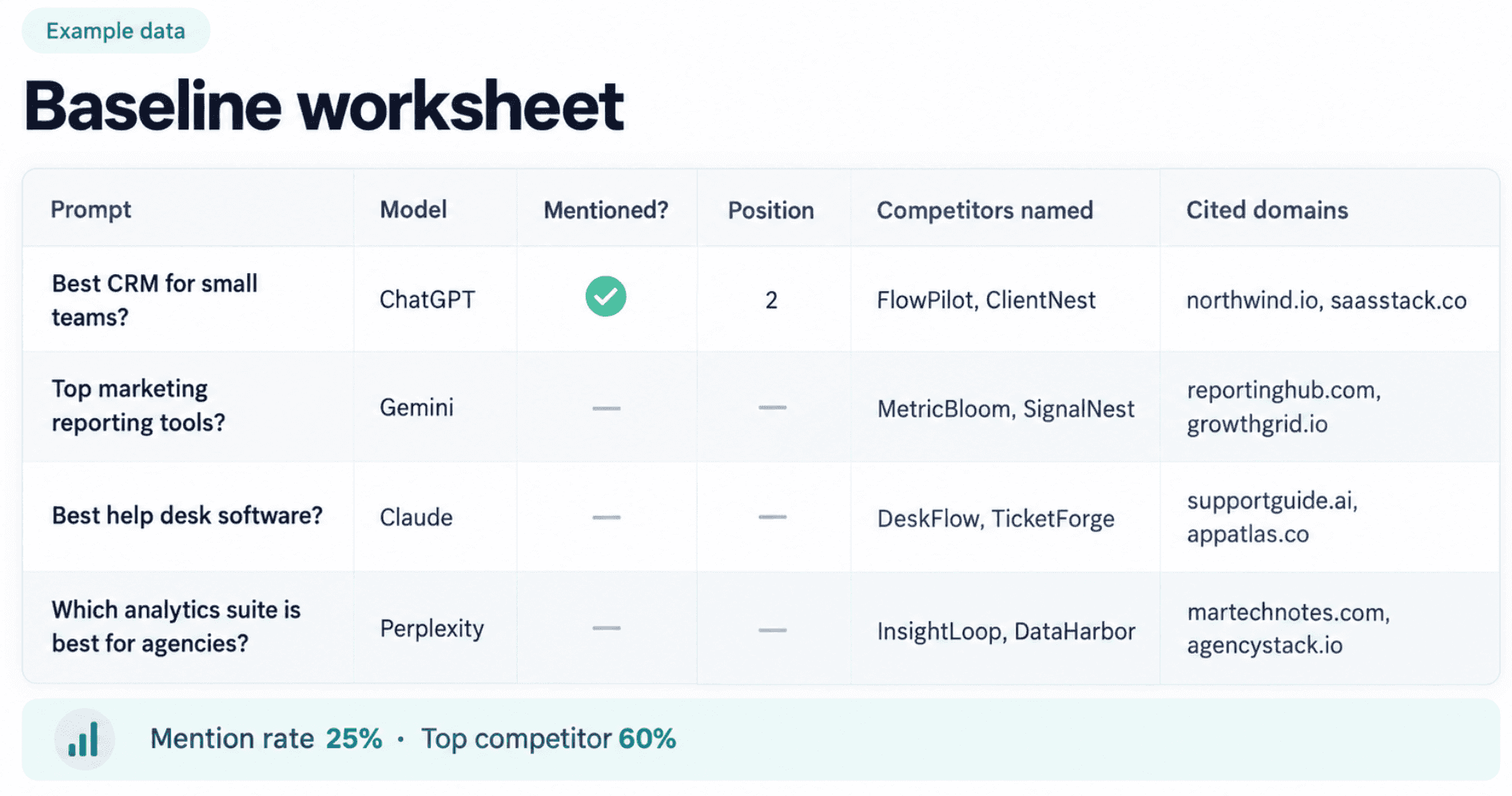
The output of Step 1 is a short list of gaps: prompts where you are absent, models where you are weak, competitors who keep winning, and domains that keep getting cited. Every later step works on those gaps.
Step 2) Audit Technical Access for AI Crawlers
If AI systems cannot reach or read a page, nothing else in the audit matters. This step checks four things: robots.txt, firewall rules, rendering, and Google eligibility.
Check Robots.txt for Every AI Crawler That Matters
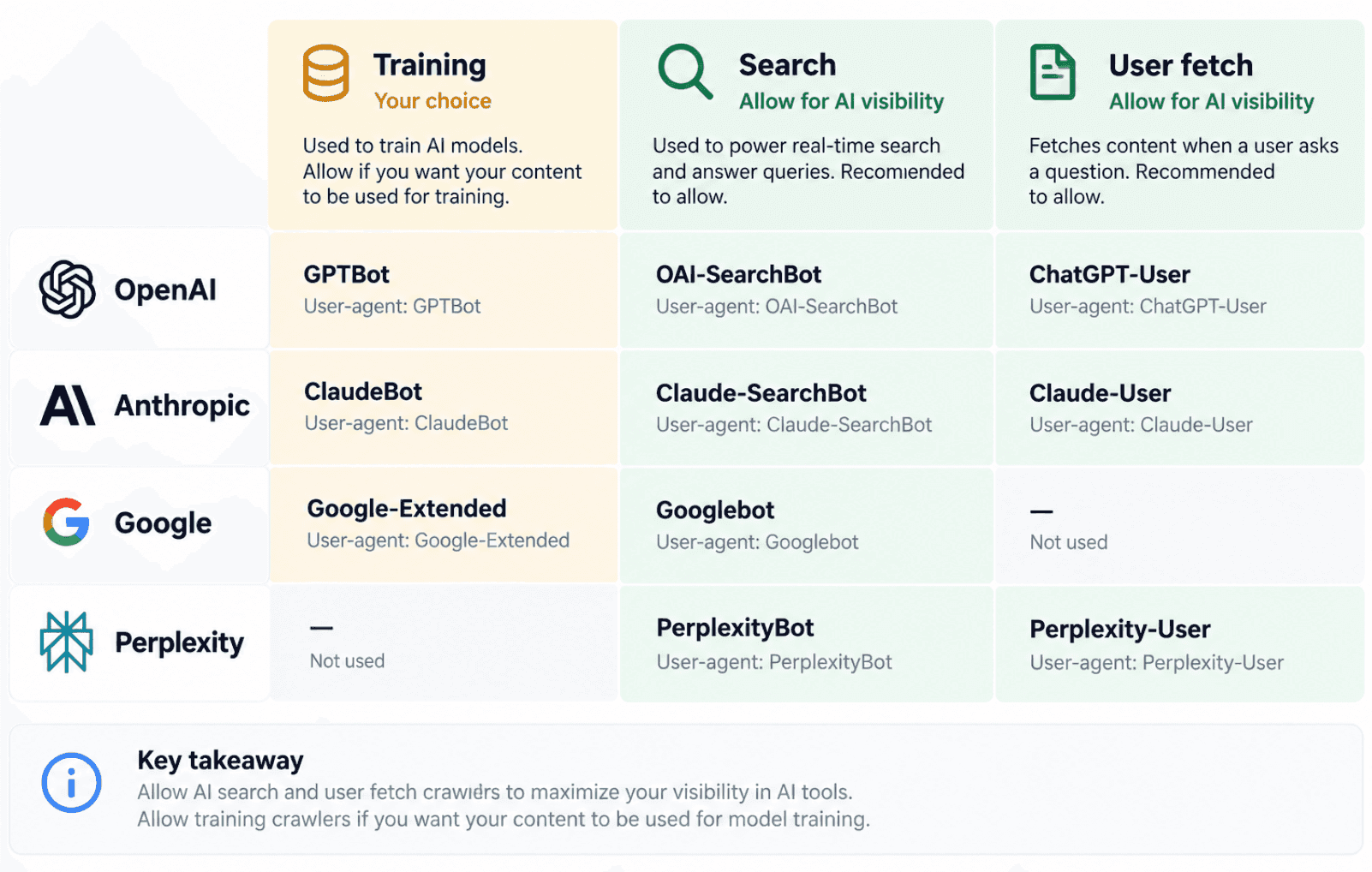
Most AI companies run separate crawlers for training, search, and user-triggered fetches, and each needs its own robots.txt rule. Blocking a training crawler does not block the search crawler, and the reverse is also true.
Company | User agent | Purpose | What blocking it means |
|---|---|---|---|
OpenAI | GPTBot | Training data | Content is not used to train OpenAI models |
OpenAI | OAI-SearchBot | ChatGPT search | Pages may not be surfaced in ChatGPT’s search results |
OpenAI | ChatGPT-User | User-initiated actions | OpenAI says robots.txt rules may not apply |
Anthropic | ClaudeBot | Training data | Content is not used for Claude training |
Anthropic | Claude-SearchBot | Claude search indexing | Anthropic says this may reduce visibility in search results |
Anthropic | Claude-User | Fetches pages a user asks about | Claude cannot read the page for that user |
Googlebot | Google Search, including AI Overviews and AI Mode | Pages drop out of Search and its AI features | |
Google-Extended | Gemini model training and grounding | No effect on Google Search or AI Overviews | |
Perplexity | PerplexityBot | Perplexity search index | Pages may not appear in Perplexity answers |
Sources: OpenAI’s crawler documentation, Anthropic’s crawler help article, and Google’s generative AI guide.
A common pattern for brands that want AI visibility but not training use is to block the training crawlers and allow the search and user crawlers:
# Block training crawlersUser-agent: GPTBotDisallow: /User-agent: ClaudeBotDisallow: /# Allow AI search and user-initiated fetchesUser-agent: OAI-SearchBotAllow: /User-agent: Claude-SearchBotAllow: /User-agent: Claude-UserAllow: /User-agent: PerplexityBotAllow: /
Whether to allow training crawlers is a business decision, not a technical one. The audit’s job is to make sure the current file reflects that decision. Old files often still list retired user agents and miss the current ones.
Check Firewall and CDN Bot Rules
Robots.txt is only half the picture. CDN and firewall bot protection can block AI crawlers even when robots.txt allows them, and some hosting platforms offer rulesets that deny known AI bots by default. Check your CDN or WAF settings, then confirm in server logs that AI crawlers are actually receiving 200 responses on key pages.
Make Sure Content Is in the Raw HTML
A 2024 server-log analysis by Vercel and MERJ, The Rise of the AI Crawler, found that none of the major AI crawlers it observed, including OpenAI’s crawlers and Anthropic’s ClaudeBot, rendered JavaScript. Googlebot does render JavaScript, which is why a page can rank on Google while looking empty to ChatGPT or Claude.
The quick test is to view the page source, or fetch the page without JavaScript, and check that the main text, prices, product details, and FAQs are present. If they only appear after scripts run, use server-side rendering, static generation, or prerendering for those pages.
Confirm Google Eligibility
Google says pages must be indexed and eligible to show a snippet to appear in its generative AI features. Check that key pages are indexed in Search Console, and that they do not carry nosnippet or restrictive max-snippet rules by accident.
Do You Need llms.txt or Special Schema?
Neither is a priority. Google’s May 2026 guide says you do not need AI text files, special markup, or Markdown versions of pages to appear in its generative AI features. An Ahrefs study of llms.txt adoption across 137,000 sites found that 97% of llms.txt files were never fetched. Standard structured data that accurately describes your organization and products is still good practice, but it is not a special AI requirement.
Step 3) Audit Content for Clarity and Citability
Once crawlers can read your pages, the question becomes whether those pages are worth quoting. Google’s guide puts it plainly: unique, helpful content matters more for generative AI search than any other tactic. For the other assistants, the same principle applies, because they need clear, specific information to build an answer.
Map Every Priority Prompt to a Page
Take the prompts where you were absent in Step 1 and ask, for each one, which page on your site answers it. If the honest answer is “none,” that is a content gap, and no technical fix will close it.
Prompt type | Page that should answer it | Common gap |
|---|---|---|
“What is [category]?” | Category explainer or glossary page | No plain definition anywhere on the site |
“Best [category] tools” | Comparison or roundup page | Only product pages, no comparison content |
“[Your brand] vs [competitor]” | Head-to-head comparison | Competitors own this page, you do not |
“How much does [brand] cost?” | Public pricing page | Pricing hidden behind a sales call |
“Is [brand] good for [use case]?” | Use case or industry page | Generic homepage copy only |
Score Each Key Page Against Citability Checks
Check | What good looks like | What usually goes wrong |
|---|---|---|
Direct answer | The main question is answered in the first one or two sentences | Long introductions before the answer |
Explicit definitions | “X is…” statements for key terms | Concepts explained indirectly over several paragraphs |
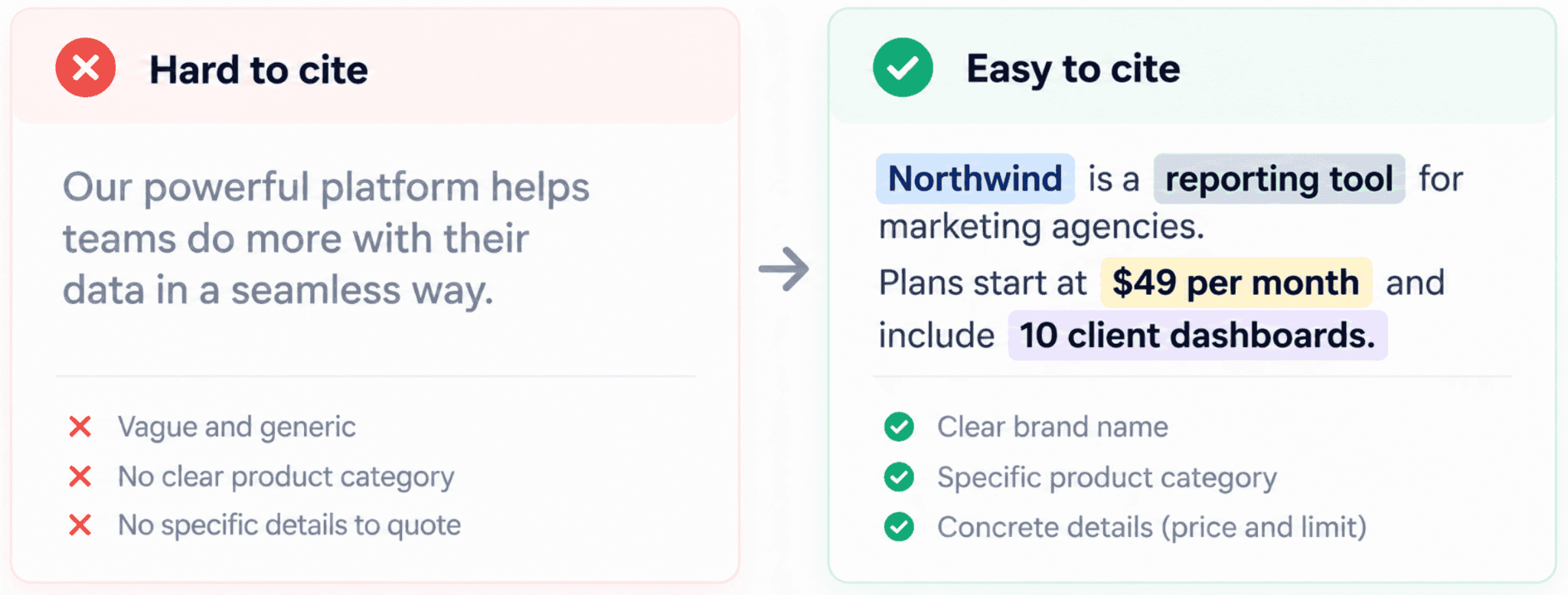
Specific facts | Prices, limits, supported platforms, dates, and numbers | Vague claims such as “powerful” or “flexible” |
Freshness | Visible update date and current information | Outdated prices, old plan names, last year’s screenshots |
Clear entities | Product and company names used instead of “it” or “we” | Pronouns that make extracted passages unclear |
Structure | Descriptive headings, tables for comparisons | One long block of text |
Evidence | Sources for claims, original data where you have it | Statistics with no source |
The last row matters more than it looks. Unsourced statistics are easy to spot, and they weaken trust in the whole page, for readers and for AI systems that cross-check facts.
Check How AI Describes You on Branded Prompts
Compare the answers from your branded prompts with your real product. Note every wrong price, retired feature, wrong category, or missing capability. Each error points to a page that is missing, outdated, or contradicted by an external source.
For detailed writing guidance once the audit is done, see our guide on how to optimize content for AI search. Teams that want software support for this step can compare dedicated AEO platforms for content optimization.
Step 4) Audit Entity and Brand Signals
AI systems need to know what your brand is before they can recommend it. Entity signals are the consistent facts about your company that appear across your site and the wider web: your name, category, products, audience, and key facts such as pricing and location.
Check these sources for consistency:
Source | What to check |
|---|---|
Your website | One clear description of what you do and who it is for, repeated consistently on the homepage, about page, and product pages |
Organization structured data | Accurate name, logo, URL, and sameAs links to your official profiles |
Social and company profiles | LinkedIn, X, YouTube, and Crunchbase descriptions that match your site |
Review platforms | G2, Capterra, Trustpilot, or industry equivalents with current product information |
Google Business Profile and Merchant Center | Correct details if you have local presence or sell products. Google’s guide notes these help products and businesses appear in AI responses |
Wikipedia and Wikidata | Only if your brand meets notability rules; do not create promotional entries |
The most common finding here is drift. A company repositions, but old descriptions live on in directories, review profiles, and partner pages. AI systems then repeat the old version. Your branded prompt answers from Step 1 usually show exactly which outdated description is winning.
Step 5) Audit the Third-Party Sources AI Relies On
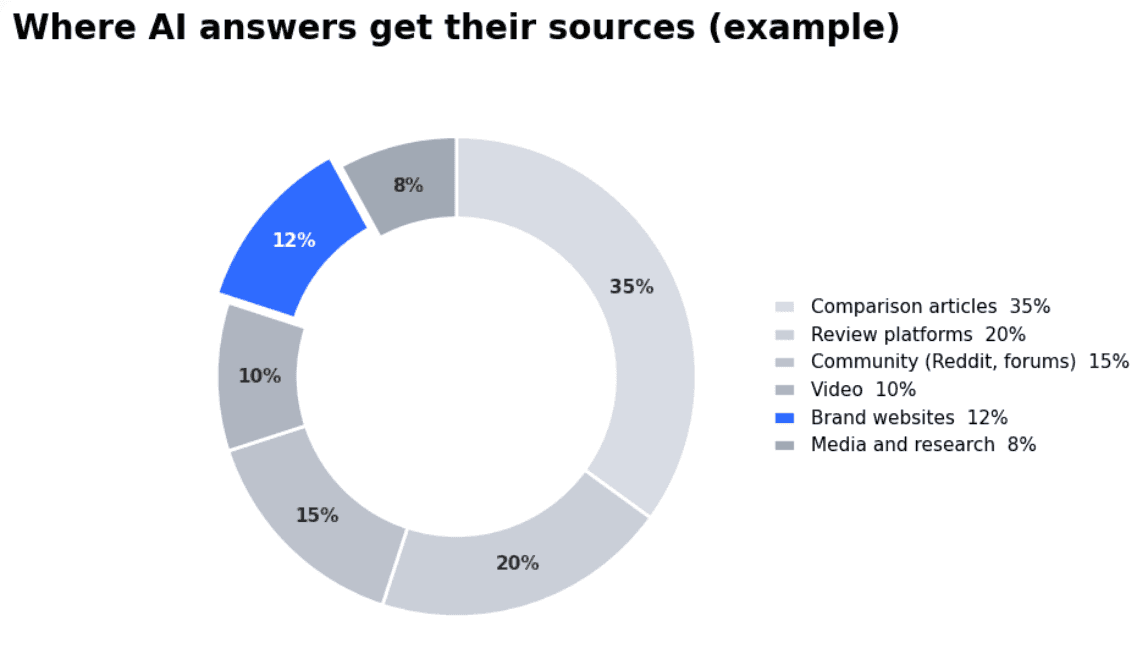
For many commercial questions, AI answers lean heavily on pages you do not own: comparison articles, review sites, community threads, and videos. The St. Gallen study Don’t Measure Once found a highly unequal citation landscape, with a small number of domains capturing most AI-generated visibility. If you are absent from those domains, on-site work alone will move slowly.
Build a Source Map From Your Baseline
Take every URL cited in the answers where you lost to a competitor in Step 1. Group them by domain and by type, then count how often each appears.
Source type | Typical examples | What to do |
|---|---|---|
Comparison and “best of” articles | Industry blogs, software review sites, publisher roundups | Ask to be evaluated; supply accurate, current product details |
Review platforms | G2, Capterra, Trustpilot | Encourage reviews from real customers and keep listings current |
Community discussions | Reddit, industry forums | Participate transparently as the brand, answer real questions |
Video | YouTube reviews and comparisons | Publish your own walkthroughs and support honest third-party reviews |
Media and research | News coverage, reports, studies | Publish original data others can reference |
Competitor-owned content | Competitor comparison pages | Publish your own accurate comparison pages |
Keep outreach honest. Google’s guide explicitly warns against manufacturing inauthentic mentions to influence generative AI results. The goal is to be accurately represented where buyers and AI systems already look, not to flood the web with planted mentions.
Source mapping is one of the most time-consuming parts of a GEO audit to do by hand. Most platforms for tracking AI visibility record cited URLs automatically. Visby, for example, maps the source domains behind each answer and tracks review and social proof signals across G2, Trustpilot, and Reddit.
Step 6) Prioritize the Findings
A GEO audit usually produces more fixes than a team can do in a quarter. Sort them by impact and effort, and always fix blockers first, because a page that crawlers cannot read gains nothing from better content.
Priority | Type of fix | Examples | Why it comes here |
|---|---|---|---|
1. Blockers | Technical access | Unblock AI search crawlers, fix firewall rules, server-render key pages | Nothing else works until these are fixed |
2. High-intent gaps | Missing commercial content | Public pricing, comparison pages, use case pages | These prompts are closest to a purchase |
3. Accuracy | Entity and branded answers | Correct outdated descriptions on your site and key profiles | Wrong answers cost deals directly |
4. Authority | Third-party coverage | Inclusion in frequently cited roundups, reviews, and community answers | Moves unbranded visibility, but takes longer |
5. Depth | Supporting content | Definitions, guides, original data | Builds topical authority over time |
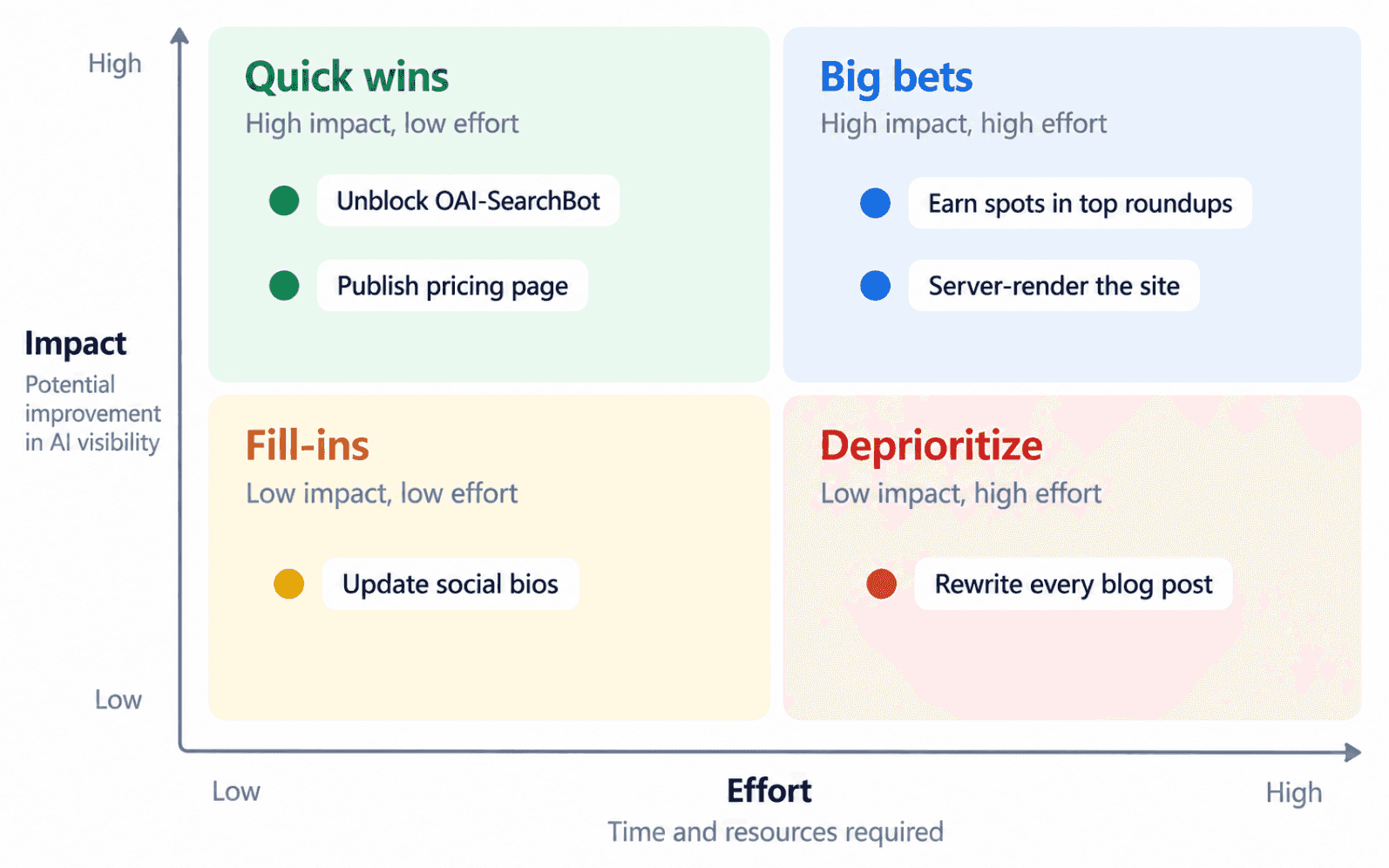
After the fixes go live, rerun the same prompts from Step 1 on the same models. Keep the prompt set unchanged so you can see whether visibility moved because of the work, not because you measured something different.
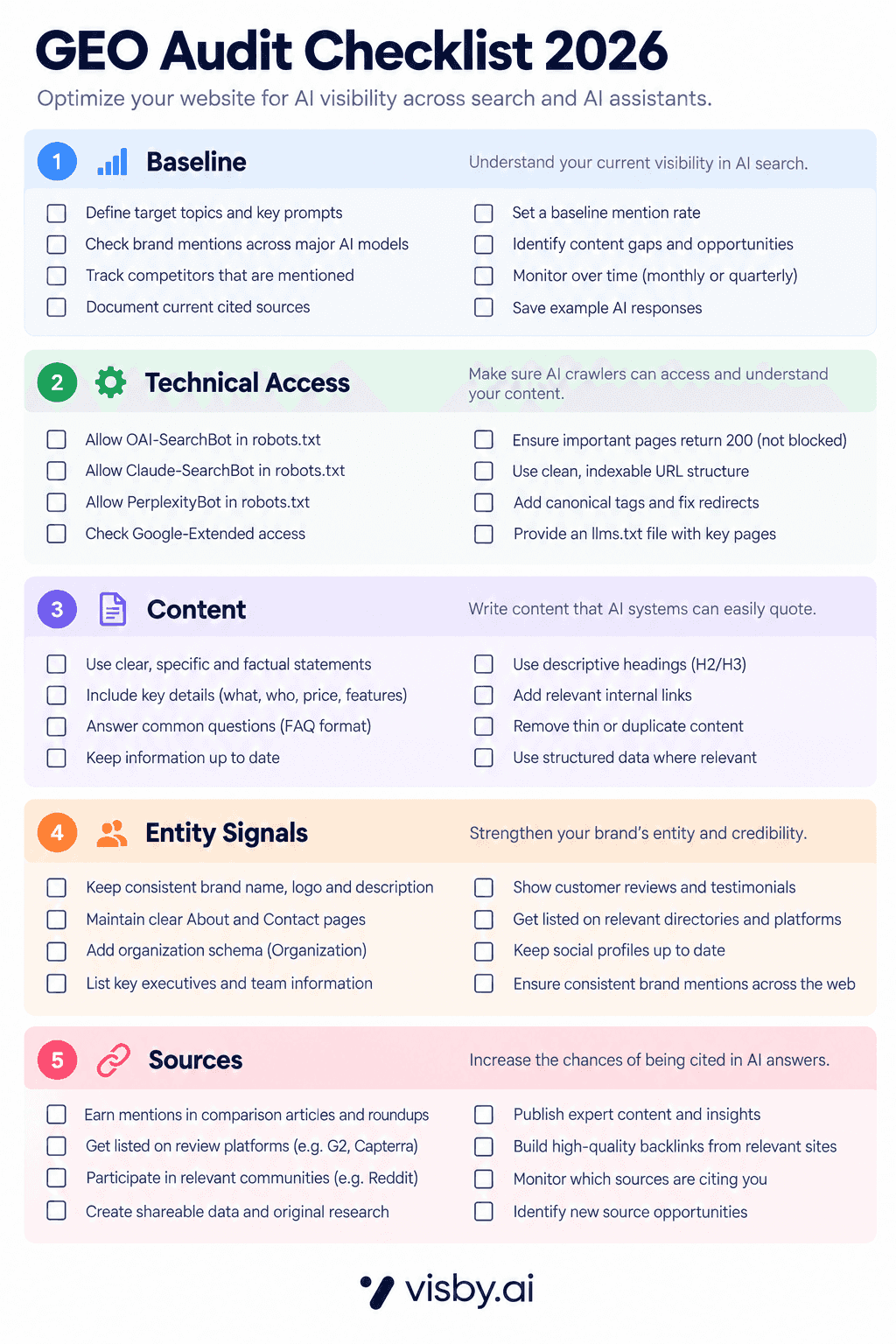
The Complete GEO Audit Checklist
Use this checklist as a working document for each audit.
Area | Check | Pass if |
|---|---|---|
Baseline | Prompt set covers awareness, consideration, decision, and branded prompts | 30+ prompts, branded kept separate |
Baseline | Each prompt run several times per model | Rates, not single answers, are recorded |
Baseline | Competitors and cited domains recorded | A list of top competitors and top cited domains exists |
Baseline | Search Console and Bing AI reports reviewed | First-party AI impressions and citations noted |
Technical | Robots.txt reviewed for each AI crawler | Search and user crawlers allowed; training crawlers match your policy |
Technical | Firewall and CDN bot rules checked | AI crawlers receive 200 responses on key pages |
Technical | Key content present in raw HTML | Main text, prices, and FAQs visible without JavaScript |
Technical | Google indexing and snippet eligibility | Key pages indexed, no accidental nosnippet |
Content | Every priority prompt maps to a page | No priority prompt without an answering page |
Content | Pages answer first and define terms | Direct answer in the opening sentences |
Content | Facts are specific, current, and sourced | No vague claims or unsourced statistics |
Content | Pricing and comparison pages exist | Public pricing and at least one comparison page |
Entity | Brand description is consistent | Same category and positioning across site and profiles |
Entity | Organization schema is accurate | Correct name, logo, URL, and sameAs links |
Entity | Branded AI answers are accurate | No wrong prices, features, or categories |
Sources | Source map built from lost prompts | Top cited domains grouped by type |
Sources | Presence on top cited domains checked | Gaps listed with an owner for each |
Prioritization | Fixes ranked by impact and effort | Blockers scheduled first |
Follow-up | Baseline rerun after fixes | Same prompts and models compared |
Can You Automate a GEO Audit?
Parts of it, yes. Visibility tracking, crawler checks, and source mapping are repetitive and well suited to software. Judgment calls, such as positioning, which comparisons to publish, and outreach, still need people.
Visby covers the repetitive side in one workflow: it tracks prompts by funnel stage, scans your site, and turns visibility gaps into prioritized technical and content GEO tasks. For other options, see our comparison of GEO software, and if you want SEO and AI audits in one suite, these AI-powered SEO suites.
GEO Audit FAQ
How long does a GEO audit take?
The technical, content, and entity checks can usually be done in days for a small or mid-sized site. The visibility baseline takes longer, because reliable mention rates need two to four weeks of repeated runs. Plan for the baseline first and run the other checks while it collects.
How often should you run a GEO audit?
Run a full GEO audit once or twice a year, and after major site changes such as a redesign, migration, or repositioning. Keep visibility tracking running continuously between audits so you notice drops early.
Is a GEO audit the same as an AI visibility audit?
Yes, the terms are used interchangeably. Some teams use “AI visibility audit” for the measurement part only, and “GEO audit” for measurement plus the technical, content, and off-site review. This guide covers the full version.
Does blocking GPTBot remove you from ChatGPT?
Not by itself. OpenAI’s documentation separates GPTBot, which collects training data, from OAI-SearchBot, which is used to surface websites in ChatGPT’s search features. Blocking GPTBot while allowing OAI-SearchBot is a common setup for brands that want ChatGPT visibility without training use.
Can you run a GEO audit for free?
Partly. Google Search Console, Bing Webmaster Tools, your robots.txt file, server logs, and a page’s raw HTML cover much of the technical side at no cost. Manual prompt checks work for a handful of questions, but a reliable baseline across several AI models usually needs a tracking tool.
Do you need an llms.txt file to pass a GEO audit?
No. Google says it does not need AI text files for its generative AI features, and adoption studies show most llms.txt files are rarely fetched. Treat it as optional, and spend audit time on crawler access, content, and sources first.
Turn the Audit Into a Plan
A GEO audit is only useful if it changes what the team works on next. Start with the baseline, clear the technical blockers, then work through content, entity, and source gaps in order of impact, and rerun the same prompts to see what moved.
If you want the baseline, site scan, and a prioritized task list generated from the same data, you can start a Visby trial and run your first GEO audit on the prompts that matter to your business.
NEXT ARTICLE
